Oh Lordy... The Party Cometh - Alex
Party System Updates
As mentioned last week, a key system that needed to be completed was the Party system. This included:
- Chatting with an NPC
- Making a dialogue choice to add them to the party
- Adding them to the Party data structure
- Having the NPC follow the player
- Changing the dialogue to allow the player to remove them after successfully adding them to the party
- Removing the NPC
- Stopping the NPC from following the player
Despite roughly breaking this down into seven steps (and psyching myself out about coding best practices and modularity), this wasn't too difficult a task. The hardest parts were figuring out YarnCommands, how to link GameObjects to ScriptableObjects (a perpetual problem), and stopping me from shooting myself in the foot (another perpetual problem).
Recruitment
YarnCommands
We're currently using YarnSpinner as our narrative tool. YarnCommands are actually quite simple to setup and use, but because of the extra information we need, its simplicity ended up obscuring my understanding of how to access this info under the hood.
For example, YarnCommands work like so:
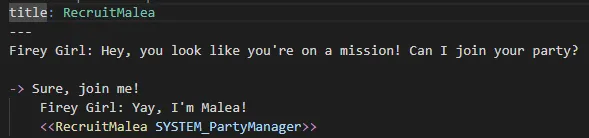
I wanted this piece of dialogue to be modular and for the function to be able to be used for all recruitable NPCs. However, as I couldn't figure out how to determine which GameObject was triggering this YarnCommand, I wasn't able to make it quite as modular as I had been hoping.
This, of course, isn't a huge deal. Ultimately, we decided that it was more important to just get the thing done and have it working than worry about writing Beautiful Code. (This is something I often get hung up on.) So while I hate the fact that I have so many different Yarn Scripts that do the same thing, what matters is that I figured out a simpler way to do what I needed to do and that it actually exists and is usable.
Code
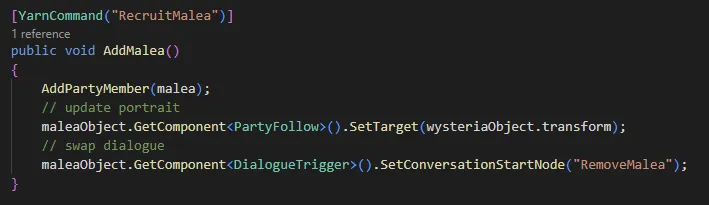 The code for recruitment ended up being as shown above. We add the PartyMember to a linked list of PartyMembers via the script shown in my last devlog. Then we update the character's follow target to the player character using a script Steele had written last semester and we swap the dialogue over to another Yarn Script that allows you to remove said character from the party.
Removing Party Members
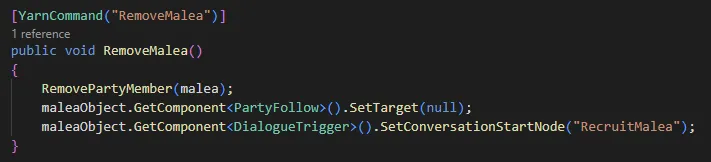
Removing Party Members was similar. It ended up being all the steps mentioned above but in reverse.
Updating Camp Menu
The biggest update for this was the visual update on the camp menu interface. As the original test was just a mockup, there was a lot of sorting that had to be done to make it more modular. Thankfully, none of this was particularly difficult; it was just a lot of busy work.
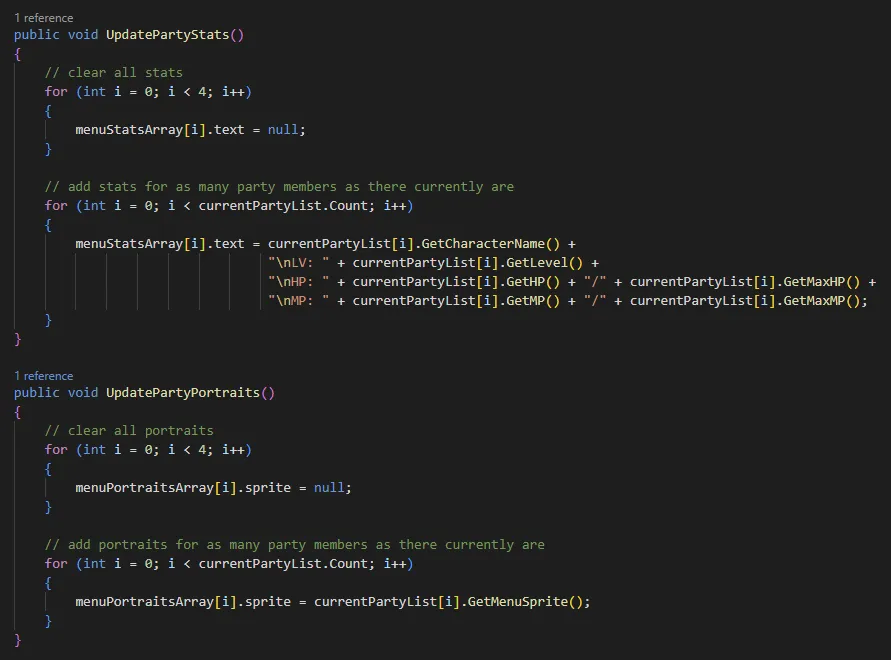
We had set up Get functions for the information necessary to display per Party Member previously, so the stat update and portrait updates were just a matter of accessing that information and updating it on the menu.
The first for loop is meant to clear out the stats any time there's a change to the party before rewriting the information again. This is meant for when you remove characters from the party.
Bonus: Wysteria Sprite Updates

She Is The Moment.